Showing posts with label C#. Show all posts

Saturday, February 17, 2018

Zero downtime Azure App Service deployments with EF6 Code First Migrations and MVC5

This post is about how we deploy our production web sites to an Azure Web App Service and execute Entity Framework 6 code first migrations as part of a VSTS Release process.


A little bit of history:

What we were doing was running dbMigrator.Update() on the start of the website.

So in Startup.cs we had this:

var efConfiguration = new Configuration();

var dbMigrator = new System.Data.Entity.Migrations.DbMigrator(efConfiguration);

dbMigrator.Update();

This worked well, it upgraded the database, and applied any seed data. The downside was the site became unusable until all this had finished which for us was about 1 minute.

This also had a major downside when we turned on Azure auto scaling on the App Plan, when it scaled to more than 1 instance, all instances started up, and all of them called dbMigrator.Update(). Resulting in a fair number of exceptions and the site failing to start.


What we now do:

We needed to remove the database logic from Startup.cs and do it as part of the VSTS Release process instead. So we deploy the site to a staging slot, execute database migrations via Migrate.exe into the production database (on the build server), and then swap the staging slot to production.

This does mean the production web site code is running against a newer database schema until the site swaps over, but this is fine as long as the developers code to handle current and current-1 database versions.  This is how production now looks, sharing the same database.

clip_image002

How to implement this:

1. The build Process

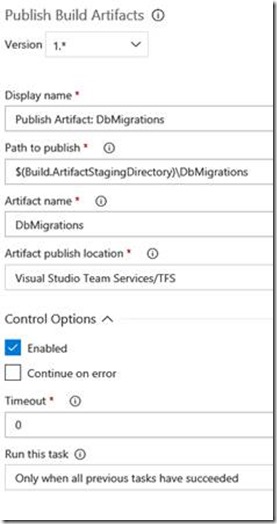
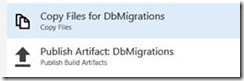
As well as packaging up the website into its own Artifact we now package up as another Artifact all the files we need in order to run migrate.exe, so we have 2 extra build tasks as part of our Main branch build:
clip_image004

clip_image006

clip_image008

In the contents section:

line 1 : Copies our dll’s containing our entity framework migrations

line 2: Copies the DeployDatabase.ps1 PowerShell script below

line 3: Copies the migrate.exe provided by Entity Framework in the packages folder.

The DeployDatabase.ps1 PowerShell file contains:

#

# DeployDatabase.ps1

#

[CmdletBinding()]

Param(

[Parameter(Mandatory=$True,Position=1)]

[string]$webAppName,

[Parameter(Mandatory=$False,Position=2)]

[string]$slotName,

[Parameter(Mandatory=$False,Position=3)]

[string]$slotResourceGroup

)

cls

$ErrorActionPreference = "Stop" # Stop as soon as an error occurs

if($slotName -ne $null -and $slotName -ne '') {

$isSlot = $True

}

else {

$isSlot = $False

}

Write-Host "PSScriptRoot : " $PSScriptRoot

Write-host "Web app: " $webAppName

Write-Host "Using slot: " $isSlot " " $slotName

Write-Host "SlotResourceGroup: " $slotResourceGroup

$dll = "SiteDataAccess.Extended.Customer.dll"

Write-Host "Using dll: " $dll

if($isSlot) {

$GetWebSite = Get-AzureRmWebAppSlot -Name $webAppName -Slot $slotName -ResourceGroupName $slotResourceGroup

}

else {

$GetWebSite = Get-AzureRmWebApp -Name $webAppName

}

$Connection = $GetWebSite.SiteConfig.ConnectionStrings | Where {$_.name -eq "ExtendedSiteDBContext"}

$ConnectionString = $Connection.ConnectionString

Write-host "Executing Database migrations and seeding with Migrate.exe"

& "$PSScriptRoot\migrate.exe" $dll /connectionString=$ConnectionString /connectionProviderName="System.Data.SqlClient" /verbose

if ($LastExitCode -ne 0) {

throw 'migrate.exe returned a non-zero exit code...'

}

Write-host "Finished executing Database migrations and seeding with Migrate.exe"

Write-host "Finished"

What that script does when called from an Azure Powershell task in a Release definition is lookup the connectionString from the web app service in Azure and then uses that to call migrate.exe. We did this so we did not have to store any connectionStrings in VSTS. If the sql user in the connectionString used when executing migrate.exe needs different permissions to that of the website you could change this to use VSTS release variables instead.


2. The Release definition

When we release a site our process is:

· Stop the deployment slot ‘stage’

· Deploy the website zip to slot ‘stage’

· Update the database using the PowerShell script

· Start the Stage site

· Swap Stage with production

· Ping production site

· Stop the stage site (to save resources)


Our release definition looks like this:

Release definition

Task Groups

clip_image010

clip_image012

clip_image014

The Update Database task is just an Azure PowerShell task containing:

clip_image016

In Azure the App Service Plan is configured so that the production site and the stage slot are almost identical (baring a few appSetting values). They share the same connectionString and every appSetting and ConnectionString value has the ‘Slot Setting’ checkbox ticked.


Our big gotcha

Was during the swap slots task the website will be warm started automatically by that process hitting localhost under http, or it will try the domain name of the site but again under http. We had this in our filter.config

// Ensure all http connections are redirected to https

filters.Add(new RequireHttpsAttribute());


Which meant the warm start process instantly failed to start the site, the swap process continued and the site then started up from cold in production. We could see that because our ping task that pinged the production site, was taking a minute to respond.

What we had to do was create a custom version of the RequireHttpsattribute, once we did this our ping task responds in 1-3 seconds:

// Ensure all http connections are redirected to https

filters.Add(new CustomRequireHttpsAttribute());


And the code for the attribute is:

[AttributeUsage(AttributeTargets.Class | AttributeTargets.Method, Inherited = true, AllowMultiple = false)]

public class CustomRequireHttpsAttribute : RequireHttpsAttribute

{

    protected override void HandleNonHttpsRequest(AuthorizationContext filterContext)

{

    string ipAddress = filterContext.RequestContext.HttpContext.Request.UserHostAddress;

    var userAgent = filterContext.RequestContext.HttpContext.Request.UserAgent.ToLower();

    // 0.0.0.0 and 127.0.0.1 and ::1 are used by the Azure App Service Swap Slot process to Warm up the site before swapping the slot to production

    if(ipAddress == "0.0.0.0" || ipAddress == "::1" || ipAddress == "127.0.0.1")

    //if(userAgent.Contains("sitewarmup")) // doesnt work

    {

        return;

    }

    base.HandleNonHttpsRequest(filterContext);

    }

}

Sunday, August 30, 2015

Unit Testing (part 4) - Faking Entity Framework code first DbContext & DbSet


This is the 4th in a series of posts about unit testing:

Unit Testing (part 1) - Without using a mocking framework

Unit Testing (part 2) - Faking the HttpContext and HttpContextBase

Unit Testing (part 3) - Running Unit Tests & Code Coverage

Unit Testing (part 4) - Faking Entity Framework code first DbContext & DbSet


Following on from the last 3 articles we can use the same approach of faking with test doubles on our database repository methods. 

I’m using Entity Framework 6 code first and I want to be able to call the code in my repository layer so I can test the where clauses etc, but I do not want to actually call the database.  Entity framework has a DBContext and a DbSet we just need to fake them.

All of our model properties implement this interface IDbEntity. 

    public interface IDbEntity<TPrimaryKey>

    {

        /// <summary>

        /// Unique identifier for this entity.

        /// </summary>

        TPrimaryKey ID { get; set; }

    }

What this does is say we must have a primary key called ID on each model.  We will use this later to implement a fast generic DbSet Find method.

public class Country : IDbEntity<Int32>

{

        [Key, DatabaseGenerated(DatabaseGeneratedOption.None)]     

        public Int32 ID { get; set; }


        [Required]

        [MaxLength(100)]

        public String Name { get; set; }

}

First we need to setup our DbContext so we start with our interface which just contains a list of DbSet’s (which is what we need in order to begin faking it for the unit tests).

public interface ISiteDBContext

{

        DbSet<Country> Countries { get; set; }       

}


Our concrete class that the MVC web site uses looks like this:

public class SiteDBContext : DbContext, ISiteDBContext

{

        public SiteDBContext()

            : base()

        {

            // Disable database initialisation (e.g. when the site is first run)           

     Database.SetInitializer<SiteDBContext>(null);

        }


        public SiteDBContext(string nameOrConnectionString)

            : base(nameOrConnectionString)

        {

            // Disable database initialisation (e.g. when the site is first run)           

     Database.SetInitializer<SiteDBContext>(null);

        }


        public DbSet<Country> Countries { get; set; }


        protected override void OnModelCreating(DbModelBuilder modelBuilder)

        {

            // Fluent API commands go here e.g.

            modelBuilder.Conventions.Remove<PluralizingTableNameConvention>();                 

     modelBuilder.Conventions.Remove<OneToManyCascadeDeleteConvention>();   

            base.OnModelCreating(modelBuilder);

        }

    }


And our fake one for unit testing looks like this (note the differences in yellow).  We are implementing the interface but then in the constructor setting the Country DbSet to use our FakeDbSet instead:

public class FakeSiteDBContext : DbContext, ISiteDBContext

{

      public FakeSiteDBContext() : base()

      {

         // Disable code first auto creation of a database                 

         Database.SetInitializer<FakeSiteDBContext>(null);

      Countries = new FakeDbSet<Country>();

}

public DbSet<Country> Countries { get; set; }

public override DbSet<TEntity> Set<TEntity>()

       {

            foreach (PropertyInfo property in

typeof(FakeSiteDBContext).GetProperties())

            {

                if (property.PropertyType == typeof(DbSet<TEntity>))

                {

                    var value = property.GetValue(this, null) as DbSet<TEntity>;

                    return value;

                }

            }


            // If the above fails fall back to the base default

            return base.Set<TEntity>();

  }

 }

And this is the FakeDbSet:

public sealed class FakeDbSet<TEntity> : DbSet<TEntity>, IQueryable, IEnumerable<TEntity>, IDbAsyncEnumerable<TEntity>

            where TEntity : class

    {

        ObservableCollection<TEntity> _data;

        IQueryable _query;


        public FakeDbSet()

        {

            _data = new ObservableCollection<TEntity>();

            _query = _data.AsQueryable();

        }


        public override TEntity Find(params object[] keyValues)

        {

            // Find by the Primary Key (ID) as defined in the interface IDbEntity

     // which is set on all of our model classes. This is a fast generic way to

     // implement find.

            // There is only currently 1 primary keyValue that can be passed in so we

     // use [0] to find it

            var result = _data.OfType<IDbEntity<Int32>>().Where(m => m.ID ==

(Int32)keyValues[0]);

            var myEntity = (TEntity)result.SingleOrDefault();

            return myEntity;

        }


        public override TEntity Add(TEntity item)

        {

            // In our FakeDbSet when an item is added to the context we increment it's

     // primary Key (ID column) otherwise it will always be 0

            // All our model classes inherit IDbEntity which defines an ID column as

     // the primary key

            // But note this will not update navigation properties, apperently there

     // is no way in EF to do that yet (so you have to work around it)

            if (item is IDbEntity<Int32>)

            {

                var myItem = (IDbEntity<Int32>)item;

                if (myItem.ID == 0)

                {

                    // Get the last record entered, so we can get it's ID then add 1

      // to it for the new record

                    var lastItem = _data.LastOrDefault();

                    if (lastItem == null)

                        myItem.ID = 1;

                    else

                    {

                        var myLastItem = (IDbEntity<Int32>)lastItem;

                        myItem.ID = myLastItem.ID + 1;

                    }

                }

            }


            _data.Add(item);

            return item;

        }


        public override TEntity Remove(TEntity item)

        {

            _data.Remove(item);

            return item;

        }


        public override TEntity Attach(TEntity item)

        {

            _data.Add(item);

            return item;

        }


        public override TEntity Create()

        {

            return Activator.CreateInstance<TEntity>();

        }


        public override TDerivedEntity Create<TDerivedEntity>()

        {

            return Activator.CreateInstance<TDerivedEntity>();

        }


        public override ObservableCollection<TEntity> Local

        {

            get { return _data; }

        }


        Type IQueryable.ElementType

        {

            get { return _query.ElementType; }

        }


        Expression IQueryable.Expression

        {

            get { return _query.Expression; }

        }


        IQueryProvider IQueryable.Provider

        {

            get { return new TestDbAsyncQueryProvider<TEntity>(_query.Provider); }

        }


        System.Collections.IEnumerator System.Collections.IEnumerable.GetEnumerator()

        {

            return _data.GetEnumerator();

        }


        IEnumerator<TEntity> IEnumerable<TEntity>.GetEnumerator()

        {

            return _data.GetEnumerator();

        }


        IDbAsyncEnumerator<TEntity> IDbAsyncEnumerable<TEntity>.GetAsyncEnumerator()

        {

            return new TestDbAsyncEnumerator<TEntity>(_data.GetEnumerator());

        }

    }


    internal class TestDbAsyncQueryProvider<TEntity> : IDbAsyncQueryProvider

    {

        private readonly IQueryProvider _inner;


        internal TestDbAsyncQueryProvider(IQueryProvider inner)

        {

            _inner = inner;

        }


        public IQueryable CreateQuery(Expression expression)

        {

            return new TestDbAsyncEnumerable<TEntity>(expression);

        }


        public IQueryable<TElement> CreateQuery<TElement>(Expression expression)

        {

            return new TestDbAsyncEnumerable<TElement>(expression);

        }


        public object Execute(Expression expression)

        {

            return _inner.Execute(expression);

        }


        public TResult Execute<TResult>(Expression expression)

        {

            return _inner.Execute<TResult>(expression);

        }


        public Task<object> ExecuteAsync(Expression expression, CancellationToken cancellationToken)

        {

            return Task.FromResult(Execute(expression));

        }


        public Task<TResult> ExecuteAsync<TResult>(Expression expression, CancellationToken cancellationToken)

        {

            return Task.FromResult(Execute<TResult>(expression));

        }

    }


    internal class TestDbAsyncEnumerable<T> : EnumerableQuery<T>, IDbAsyncEnumerable<T>, IQueryable<T>

    {

        public TestDbAsyncEnumerable(IEnumerable<T> enumerable)

            : base(enumerable)

        { }


        public TestDbAsyncEnumerable(Expression expression)

            : base(expression)

        { }


        public IDbAsyncEnumerator<T> GetAsyncEnumerator()

        {

            return new TestDbAsyncEnumerator<T>(this.AsEnumerable().GetEnumerator());

        }


        IDbAsyncEnumerator IDbAsyncEnumerable.GetAsyncEnumerator()

        {

            return GetAsyncEnumerator();

        }


        IQueryProvider IQueryable.Provider

        {

            get { return new TestDbAsyncQueryProvider<T>(this); }

        }

    }


    internal class TestDbAsyncEnumerator<T> : IDbAsyncEnumerator<T>

    {

        private readonly IEnumerator<T> _inner;


        public TestDbAsyncEnumerator(IEnumerator<T> inner)

        {

            _inner = inner;

        }


        public void Dispose()

        {

            _inner.Dispose();

        }


        public Task<bool> MoveNextAsync(CancellationToken cancellationToken)

        {

            return Task.FromResult(_inner.MoveNext());

        }


        public T Current

        {

            get { return _inner.Current; }

        }


        object IDbAsyncEnumerator.Current

        {

            get { return Current; }

        }

    }


Then using dependency injection in your unit test you register the FakeSiteDBContext.  Using Unity it would be:

container.RegisterType<DbContext, FakeSiteDBContext>(new PerRequestLifetimeManager());

And in the website you’d do:

container.RegisterType<DbContext, SiteDBContext>(new PerRequestLifetimeManager());


The unit test would look like this, in this example I’m calling a basketService method which would do all the same calls as if we were running the MVC web site, except in the test it is going to call our FakeDbSet and FakeDbSiteContext to avoid hitting a database because that’s what we told our dependency injection to do swap out every instance of DbContext with our FakeSiteDBContext.


[TestMethod]

public void AddToBasket_AddUSDItemToNewBasket()

{

    HttpContext.Current = new FakeHttpContext().CreateFakeHttpContext();

    unityContainer = UnityConfig.GetConfiguredContainer();

    var basketService = unityContainer.Resolve<IBasketService>();

    var httpContextWrapper = new FakeHttpContextWrapper(httpContext:

HttpContext.Current);


    var model = basketService.AddSubscriptionItemToBasket(httpContextWrapper, params go here…);


    Assert.AreEqual("en-US", model.CurrencyFormat.CurrencyCulture, "CurrencyCulture");

}


If you wanted to you can also seed the entity framework models with the same seed data you’d use in the real database, remember it’s all in memory and it’s fast.  It’s also useful as your working with the same data rather than creating fake data for every test.

There is nothing stopping you creating specific test data for one test as well, all you have to do is add populated models to the Entity Framework DbContext at the start of a unit test.

     var order = new Order()

            {

                UserBasketID = userBasketId,

                OrderItems = new Collection<OrderItem>(),

                DateCreated = DateTime.Now

            };


            var orderItem1 = new OrderItem

            {

                Price = 2.00M,

                Quantity = 1,

                DateCreated = DateTime.Now,

                Order = order

            };

            order.OrderItems.Add(orderItem1);

            dbContext.Orders.Add(order);

            dbContext.OrderItems.Add(orderItem1);

No need to save (remember it’s in memory all you have to do is .Add). 

The only downside with this approach I’ve found so far are your site will run but the tests may fail because:

  • Navigation property might = null. 
  • Not all the data is added to the context.

Remember we are faking out the DbContext and DbSet so we do not get all the Entity Framework functionality. 

To address both of these points:

  • If you have reference/navigation properties make sure you set them like the ones in yellow above (we assign the order to the orderItem).  This way your repository methods navigation properties will work in your unit test and won’t be null. 
  • If you think back to EF v1 days you had to add the items to the context that you want to save.  So in the example above EF would be fine with just the dbContext.Orders.Add(order) line it would know there are orderItems that also need saving.  But the fake DbContext won’t!  So if we are testing a lookup directly for orderItems our test would show 0 records. 

    We just have to also attach the orderItems to the dbContext too.  It won’t affect the way the site runs and our tests will pass.  So there is a compromise to be made here but in my opinion a small one.  Some people will argue that we are changing our site code to make the tests pass, and yes we are (slightly and only when we hit this scenario which has not happened to me much so far).

You should always follow up with UI integration tests such as Selenium, Microsoft’s Coded UI etc to test all the site functions and 3rd party calls work, these will be slower, but at least now we’ve got a way to run lots of fast unit tests before the code leaves Visual Studio.

Using this approach here are just some of my unit tests so you can see how quick they are:

image