Showing posts with label Asp.Net Web Forms. Show all posts

Saturday, July 2, 2011

Http to Https Flipper for Asp.Net Web Forms

This article shows how to automatically make Asp.Net Web Form sites open certain pages on the site as https by using a 301 moved permanently redirect.  It works with standard web forms .aspx pages and web forms using .Net Routing.

This example will cover the following scenarios:

1. If a user navigates to http://www.mydomain.com/default.aspx then we can automatically have the URL change to be https://www.mydomain.com/default.aspx for the default.aspx page only, other pages will remain non-secure.

2. You want all your sites web pages to always go secure (https).

3. Allow you to control which pages go secure by using a ‘RequireSSL’ attribute (much like mvc now does).

4. Allow you to control which pages go secure by listing them in the web.config.

5. If you have non standard ports for http and https e.g. http://www.mydomain.com:8054/default.aspx can change the URL to https://www.mydomain.com:4054/default.aspx.

Note the 8054 = http and 4054 = https.

6. You have non standard ports as point 5 above mentions, but in your live environment the ports are masked from the user by the firewall (or some other clever piece of hardware).  But internally the ports are still being used by the firewall to route traffic to your site.

e.g. Your web site on IIS is setup to use ports 8054(http) & 4054(https) but the user in their browser will see http://www.mydomain.com/default.aspx and https://www.mydomain.com/default.aspx.  In this scenario you would want to remove the port when you flip from http to https.


Lets see some code

First create a new project, lets call it ‘JL.Web.Security’. 
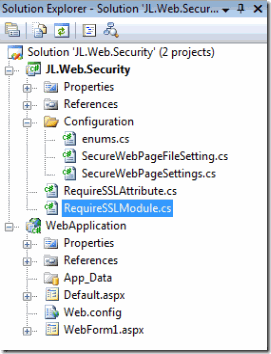
SolutionStructure

As you add the classes below the structure of the project should end up looking like the above.

Add the following 2 classes (RequireSSLAttribute.cs and RequireSSLModule.cs).

RequireSSLAttribute.cs

namespace JL.Web.Security
{
    /// <summary>
    /// Attribute to place on classes that you want to go secure (SSL / HTTPS)
    /// </summary>
    [AttributeUsage(AttributeTargets.Class)]
    sealed public class RequireSSL : Attribute
    {
    }
}

With the ‘RequireSSLAttribute’' you can now place this attribute on any web form code behind page and that page will always go secure e.g.

namespace WebApplication
{
    [RequireSSL]
    public partial class WebForm1 : System.Web.UI.Page
    {
        protected void Page_Load(object sender, EventArgs e)
        {
        }
    }
}

The ‘RequireSSLModule.cs’ class below is the one that does the real work.

But in summary all this class really does is create a new IHttpModule that listens for page requests. Then checks if every page should be secure and if we are not already secure then go secure (https).  Otherwise check if the RequireSSL attribute is on the page if it is go secure (if we are not secure already), if the attribute is not in use then check the web.config file to see if the page is listed there, if it is go secure (if we are not secure already). Otherwise go non secure (if we are currently secure).

RequireSSLModule.cs

namespace JL.Web.Security
{
    /// <summary>
    /// HttpModule for switching between HTTP and HTTPS (HTTP <=> HTTPS)
    /// </summary>
    public class RequireSSLModule : IHttpModule
    {
        SecureWebPageSettings settings = null;

        public void Init(HttpApplication context)
        {
            settings = WebConfigurationManager.GetSection("secureWebPageSettings") as SecureWebPageSettings;
            if (settings != null && settings.Mode != SecureWebPageMode.Off)
            {
                // The PreRequestHandlerExecute event occurs just before ASP.NET begins executing
                // a handler such as a Page.
                // In here we can acquire a reference to the currently executing ASPX Page
                context.PreRequestHandlerExecute += new EventHandler(OnPreRequestHandlerExecute);
            }
        }

        /// <summary>
        /// Empty, but necessary when implementing IHttpModule
        /// </summary>
        public void Dispose() { }

        /// <summary>
        /// Switch between HTTP and HTTPS as and when necessary.
        /// </summary>
        /// <param name="sender"></param>
        /// <param name="e"></param>
        void OnPreRequestHandlerExecute(object sender, EventArgs e)
        {
            bool requireSSL = false;

            // obtain a reference to the ASPX Page
            System.Web.UI.Page Page = HttpContext.Current.Handler as System.Web.UI.Page;

            // if a valid Page was not found, exit
            if (Page == null)
            {
                return;
            }

            if (settings.MakeAllPagesSecure)    // All pages must be secure
                requireSSL = true;
            else
            {
                // Check if the Page is decorated with the RequireSSL attribute
                requireSSL = (Page.GetType().GetCustomAttributes(typeof(RequireSSL), true).Length > 0);
                if (requireSSL == false)
                {
                    // Check the pages in the web.config to see if it is mentioned here as must be secure
                    var pageName = Page.GetType().BaseType.Name;
                    if (settings.Files.IndexOf(pageName) >= 0)
                        requireSSL = true;
                }
            }


            // check if the Page is currently using the HTTPS scheme
            bool isSecureConnection = HttpContext.Current.ApplicationInstance.Request.IsSecureConnection;

            // acquire the URI (e.g. http://localhost/default.aspx)
            Uri baseUri = HttpContext.Current.ApplicationInstance.Request.Url;

            String portToUse = String.Empty;


            if (requireSSL && !isSecureConnection)
            {
                // The page requires SSL and it is currently using the HTTP scheme.
                // Switch the HTTP scheme to the HTTPS scheme
                string url = baseUri.ToString().Replace(baseUri.Scheme, Uri.UriSchemeHttps);

                ChangePort(baseUri, true, ref url);

                // perform a 301 redirect to the secure url
                PermanentRedirect(url);
            }
            else if (!requireSSL && isSecureConnection)
            {
                // The page does not require SSL and it is currently using the HTTPS scheme.
                // Switch the HTTPS scheme to the HTTP scheme
                string url = baseUri.ToString().Replace(baseUri.Scheme, Uri.UriSchemeHttp);

                ChangePort(baseUri, false, ref url);

                // perform a 301 redirect to the non-secure url
                PermanentRedirect(url);
            }
        }

        /// <summary>
        /// Peforms a 301 redirect to the given url. This is the most search engine friendly
        /// way of redirecting to another Page. The 301 status code means that a Page has
        /// permanently moved to a new location.
        /// </summary>
        /// <param name="url"></param>
        private void PermanentRedirect(string url)
        {
            //throw new Exception("url:" + url);
            HttpContext.Current.Response.Status = "301 Moved Permanently";
            HttpContext.Current.Response.AddHeader("Location", url);
        }


        /// <summary>
        ///  Change or remove the port from the url
        /// </summary>
        private void ChangePort(Uri baseUri, Boolean useSecurePort, ref String url)
        {
            String portToUse = String.Empty;

            // Get the current port
            String portToFind = String.Format(":{0}", baseUri.Port.ToString());

            if (settings != null && settings.SecurityRemovePort)
            {
                // Config setting says to remove the port from the url so lets do that  
                url = url.Replace(portToFind, "");
            }
            else
            {
                // Security setting says to leave the port in the url so we need to change it
                if (useSecurePort)
                {
                    // If we are not on the standard port 80 we need to lookup the secure port from iis
                    if (baseUri.Port != 80)
                    {
                        portToUse = LookupSecurePortFromIIS();
                        String portToRepaceWith = String.Format(":{0}", portToUse);
                        url = url.Replace(portToFind, portToRepaceWith);
                    }
                }
                else
                {
                    // If we are not on the standard secure port 443 we need to lookup the non secure port from iis
                    if (baseUri.Port != 443)
                    {
                        portToUse = LookupNonSecurePortFromIIS();
                        String portToRepaceWith = String.Format(":{0}", portToUse);
                        url = url.Replace(portToFind, portToRepaceWith);
                    }
                }
            }
        }

        private String LookupSecurePortFromIIS()
        {
            return LookupPortFromIIS(true);
        }

        private String LookupNonSecurePortFromIIS()
        {
            return LookupPortFromIIS(false);
        }

        /// <summary>
        /// Using DirectoryServices look up in IIS the port that should be used
        /// when swapping from http to https or https to http
        /// </summary>
        private String LookupPortFromIIS(bool findHttpsPort)
        {
            String port = String.Empty;
            System.DirectoryServices.PropertyValueCollection serverBindings;

            // Get the current website server instance
            String websiteInstanceID = HttpContext.Current.ApplicationInstance.Request["INSTANCE_ID"];  // e.g. 1646904159

            // Connect to the IIS directory service for the website instance id
            System.DirectoryServices.DirectoryEntry path = null;
            if (!String.IsNullOrEmpty(settings.IISServerUsername) && !String.IsNullOrEmpty(settings.IISServerPassword))
                path = new System.DirectoryServices.DirectoryEntry("IIS://localhost/W3SVC/" + websiteInstanceID, settings.IISServerUsername, settings.IISServerPassword);
            else
                path = new System.DirectoryServices.DirectoryEntry("IIS://localhost/W3SVC/" + websiteInstanceID);

            // Find the port number
            if (findHttpsPort)  // Get https port
                serverBindings = path.Properties["SecureBindings"];
            else                // Get http port
                serverBindings = path.Properties["serverbindings"];

            if (serverBindings.Value != null)
            {
                String bindingValue = serverBindings.Value.ToString();

                // Just get the port number (remove everything else)
                bindingValue = bindingValue.Substring(bindingValue.IndexOf(":") + 1);

                port = bindingValue.Replace(":", "");
            }

            return port;
        }
    }
}

The LookupPortFromIIS method is the one that needs the most explaining.  In the case when you are using non standard ports e.g. not 80 for http and not 443 for https, then in order to flip from http://mydomain.com:8054 to https://mydomain.com:4054 this method looks up from the IIS server what port number should be used.  So if you were going from http on port 8054 we would look up in IIS that we need port 4054 in order to go secure.  And if we were already secure we would look up that we need port 8054 to go non-secure.  To do this lookup into IIS we use DirectoryServices which has been tested on IIS6 and IIS7.


And finally to support controlling which pages go secure via the web.config we need to add some configuration code. Add to this project a ‘Configuration’ directory.  Under the configuration directory add the following 3 classes (enums.cs, SecureWebPageFileSetting.cs and SecureWebPageSettings.cs).

enums.cs

namespace JL.Web.Security.Configuration
{
    public enum SecureWebPageMode
    {
        /// <summary>
        /// Web page security is on
        /// </summary>
        On,

        /// <summary>
        /// Web page security is off
        /// </summary>
        Off
    }
}


SecureWebPageFileSetting.cs

namespace JL.Web.Security.Configuration
{
    /// <summary>
    /// Represents an file entry in the <secureWebPageSettings>
    /// configuration section.
    /// </summary>
    public class SecureWebPageFileSetting : ConfigurationElement
    {
        #region Constructors
        /// <summary>
        /// Creates an instance of SecureWebPageFileSetting.
        /// </summary>
        public SecureWebPageFileSetting()
            : base()
        {
        }

        /// <summary>
        /// Creates an instance with an initial page name.
        /// </summary>
        /// <param name="pagename">The page class name e.g. login (not login.aspx).</param>
        public SecureWebPageFileSetting(string pagename)
            : this()
        {
            Pagename = pagename;
        }
        #endregion

        /// <summary>
        /// Gets or sets the path of this file setting.
        /// </summary>
        [ConfigurationProperty("pagename", IsRequired = true, IsKey = true)] 
        public string Pagename
        {
            get { return (string)this["pagename"]; }
            set { this["pagename"] = value; }
        }
    }

    /// <summary>
    /// Represents a collection of SecureWebPageFileSetting objects.
    /// </summary>
    public class SecureWebPageFileSettingCollection : ConfigurationElementCollection
    {
        /// <summary>
        /// Gets the element name for this collection.
        /// </summary>
        protected override string ElementName
        {
            get { return "files"; }
        }

        /// <summary>
        /// Gets a flag indicating an exception should be thrown if a duplicate element
        /// is added to the collection.
        /// </summary>
        protected override bool ThrowOnDuplicate
        {
            get { return true; }
        }

        /// <summary>
        /// Gets the element at the specified index.
        /// </summary>
        /// <param name="index">The index to retrieve the element from.</param>
        /// <returns>The SecureWebPageFileSetting located at the specified index.</returns>
        public SecureWebPageFileSetting this[int index]
        {
            get { return (SecureWebPageFileSetting)BaseGet(index); }
        }

        /// <summary>
        /// Gets the element with the specified pagename.
        /// </summary>
        /// <param name="pagename">The pagename of the element to retrieve.</param>
        /// <returns>The SecureWebPageFileSetting with the specified pagename.</returns>
        public new SecureWebPageFileSetting this[string pagename]
        {
            get
            {
                if (pagename == null)
                    throw new ArgumentNullException("pagename");
                else
                    return (SecureWebPageFileSetting)BaseGet(pagename.ToLower(CultureInfo.InvariantCulture));
            }
        }

        #region Collection Methods
        /// <summary>
        /// Adds a SecureWebPageFileSetting to the collection.
        /// </summary>
        /// <param name="fileSetting">An initialized SecureWebPageFileSetting instance.</param>
        public void Add(SecureWebPageFileSetting fileSetting)
        {
            BaseAdd(fileSetting);
        }

        /// <summary>
        /// Clears all file entries from the collection.
        /// </summary>
        public void Clear()
        {
            BaseClear();
        }

        /// <summary>
        /// Removes a SecureWebPageFileSetting from the collection with a matching pagename as specified.
        /// </summary>
        /// <param name="pagename">The pagename of a SecureWebPageFileSetting to remove.</param>
        public void Remove(string pagename)
        {
            int Index = IndexOf(pagename);
            if (Index >= 0)
                BaseRemoveAt(Index);
        }

        /// <summary>
        /// Removes the SecureWebPageFileSetting from the collection at the specified index.
        /// </summary>
        /// <param name="index">The index of the SecureWebPageFileSetting to remove.</param>
        public void RemoveAt(int index)
        {
            BaseRemoveAt(index);
        }
        #endregion

        /// <summary>
        /// Creates a new element for this collection.
        /// </summary>
        /// <returns>A new instance of SecureWebPageFileSetting.</returns>
        protected override ConfigurationElement CreateNewElement()
        {
            return new SecureWebPageFileSetting();
        }

        /// <summary>
        /// Gets the key for the specified element.
        /// </summary>
        /// <param name="element">An element to get a key for.</param>
        /// <returns>A string containing the pagename of the SecureWebPageFileSetting.</returns>
        protected override object GetElementKey(ConfigurationElement element)
        {
            if (element != null)
                return ((SecureWebPageFileSetting)element).Pagename.ToLower(CultureInfo.InvariantCulture);
            else
                return null;
        }

        /// <summary>
        /// Returns the index of an item with the specified pagename in the collection.
        /// </summary>
        /// <param name="pagename">The pagename of the item to find.</param>
        /// <returns>Returns the index of the item with the pagename.</returns>
        public int IndexOf(string pagename)
        {
            if (pagename == null)
                throw new ArgumentNullException("pagename");
            else
                return this.IndexOf((SecureWebPageFileSetting)BaseGet(pagename.ToLower(CultureInfo.InvariantCulture)));
        }

        public int IndexOf(SecureWebPageFileSetting item)
        {
            if (item != null)
                return BaseIndexOf(item);
            else
                return -1;
        }
    }
}


SecureWebPageSettings.cs

namespace JL.Web.Security.Configuration
{
    /// <summary>
    /// Contains the settings of a secureWebPageSettings configuration section.
    /// </summary>
    public class SecureWebPageSettings : ConfigurationSection
    {
        /// <summary>
        /// Creates an instance of SecureWebPageSettings.
        /// </summary>
        public SecureWebPageSettings()
            : base()
        {
        }

        #region Properties
        /// <summary>
        /// Gets or sets the mode indicating how the secure web page settings handled.
        /// </summary>
        [ConfigurationProperty("mode", DefaultValue = SecureWebPageMode.On)]
        public SecureWebPageMode Mode
        {
            get { return (SecureWebPageMode)this["mode"]; }
            set { this["mode"] = value; }
        }

        /// <summary>
        /// Gets the collection of file settings read from the configuration section.
        /// </summary>
        [ConfigurationProperty("files")]
        public SecureWebPageFileSettingCollection Files
        {
            get { return (SecureWebPageFileSettingCollection)this["files"]; }
        }

        /// <summary>
        /// Gets or sets the remove port mode.  This should be set to true when SSL is on a non standard port
        /// </summary>
        [ConfigurationProperty("securityRemovePort", DefaultValue = false)]
        public bool SecurityRemovePort
        {
            get { return (bool)this["securityRemovePort"]; }
            set { this["securityRemovePort"] = value; }
        }

        /// <summary>
        /// Makes all pages on the site secure, regardless of what is specified in the files section.
        /// </summary>
        [ConfigurationProperty("makeAllPagesSecure", DefaultValue = false)]
        public bool MakeAllPagesSecure
        {
            get { return (bool)this["makeAllPagesSecure"]; }
            set { this["makeAllPagesSecure"] = value; }
        }

        /// <summary>
        /// IIS Server user name use to login to directory services
        /// </summary>
        [ConfigurationProperty("iisServerUsername", DefaultValue = "")]
        public String IISServerUsername
        {
            get { return (String)this["iisServerUsername"]; }
            set { this["iisServerUsername"] = value; }
        }

        /// <summary>
        /// IIS Server password use to login to directory services
        /// </summary>
        [ConfigurationProperty("iisServerPassword", DefaultValue = "")]
        public String IISServerPassword
        {
            get { return (String)this["iisServerPassword"]; }
            set { this["iisServerPassword"] = value; }
        }
        #endregion
    }
}


In our web site we configure the Http to Https flipper:

Add the following line to the web.config configSections.

<section name="secureWebPageSettings" type="JL.Web.Security.Configuration.SecureWebPageSettings, JL.Web.Security" />

Add the following line to the web.config modules section under system.webServer.

<add name="JL.Web.Security.RequireSSLModule" type="JL.Web.Security.RequireSSLModule" preCondition="managedHandler" />


You can now use the ‘RequireSSLAttribute’' by placing this attribute on any web form code behind page and that page will always go secure e.g.

namespace WebApplication
{
    [RequireSSL]
    public partial class WebForm1 : System.Web.UI.Page
    {
        protected void Page_Load(object sender, EventArgs e)
        {
        }
    }
}

And in the web.config add the following to control the http to https flipper settings:

<!-- SSL Configuration -->
    <secureWebPageSettings mode="On" securityRemovePort="False" makeAllPagesSecure="False">
        <files>
            <add pagename="WebForm1" />
        </files>
    </secureWebPageSettings>

secureWebPageSettings mode=”Off”   - Disables the http to https flipper, which you will want to do if you are using Visual Studio’s built in web server as that does not support https.

secureWebPageSettings mode =”On”   - Enable the flipper, use this when the code is running on an IIS server.

secureWebPageSettings securityRemovePort = “True”   - This will remove the port from the URL (to be used in scenario 6 I mentioned at the top of this article).

secureWebPageSettings makeAllPagesSecure = “True”   - All pages on your site will go secure.

secureWebPageSettings makeAllPagesSecure = “False”   - Only pages using the RequireSSL attribute or those listed in the <files> section in the web.config will go secure.  All other pages will flip back to non-secure.

In the add files section you should add a line for each page that you want to go secure.  The pagename is the class name of the page (as in the code behind page e.g. WebForm1)

namespace WebApplication
{
    public partial class WebForm1 : System.Web.UI.Page
    {
        protected void Page_Load(object sender, EventArgs e)
        {
        }
    }
}

To test the code you will need an SSL, you can create your own on IIS6 using the SelfSSL tool that comes with the IIS6 Resource Kit that can be downloaded here: http://www.microsoft.com/download/en/details.aspx?displaylang=en&id=17275.

Or on IIS7 here is a good post on setting up a self certificate: http://weblogs.asp.net/scottgu/archive/2007/04/06/tip-trick-enabling-ssl-on-iis7-using-self-signed-certificates.aspx

And finally on IIS7 when the app pool is running in Managed Pipeline Mode = Integrated you will need to add the JL.Web.Security.RequireSSLModule to the ‘Modules’ section in IIS Manager for the website.
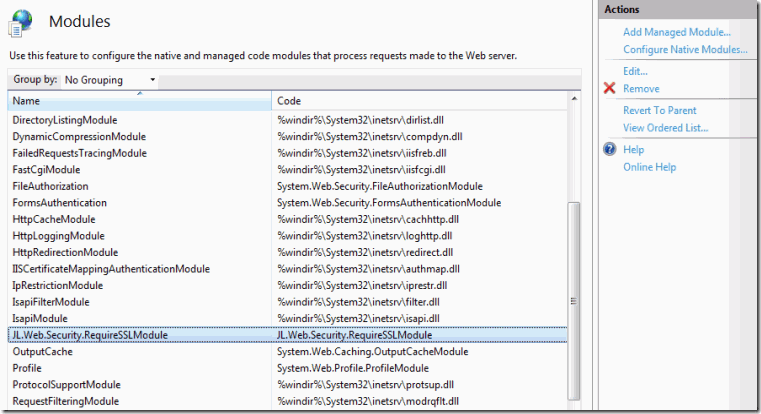
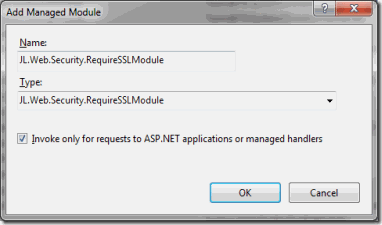
Modules

AddModule

Here is the source code

Sunday, June 19, 2011

Add a Permanent 301 Redirect Route Using .Net Routing 3.5

As pages on our sites get old and replaced sometimes we need to redirect users to the newer pages.  You can do this in .Net Routing by setting up a new route which does a 301 (Permanent) redirect.

You will need a new route handler method to do the redirect.  The code for this is shown below:

/// <summary>
/// This route handler allows redirecting old urls to a new page/route name and 
/// sets a permanent 301 status code (Moved Permanently)
/// This can be invoked from the global.asax.cs like this:
///     The route below will redirect requests from somedirectory/A.aspx to somedirectory/login
///     routes.Add("OLDRoute1", new CustomRoute("somedirectory/A.aspx", new PermanentRedirectRouteHandler("login")));
/// </summary>
public class PermanentRedirectRouteHandler : IRouteHandler, IHttpHandler
{
    public PermanentRedirectRouteHandler(string virtualPath)
    {
        this.VirtualPath = virtualPath;
    }

    public string VirtualPath { get; private set; }
    private RequestContext requestContext = null;

    public IHttpHandler GetHttpHandler(RequestContext requestContext)
    {
        this.requestContext = requestContext;
        return this;
    }

    public bool IsReusable
    {
        get { return false; }
    }

    public void ProcessRequest(HttpContext context)
    {
        context.Response.StatusCode = 301;
        context.Response.AppendHeader("Location", VirtualPath);
    }
}

While testing you might want to change the StatusCode to 302 (temporary redirect).

To create a route using the PermanentRedirectRouteHandler method you would add a route like this:

Example 1:

routes.Add("OLDRoute1", new CustomRoute("A.aspx", new PermanentRedirectRouteHandler("login")));

The route above will redirect a request to ‘http://mydomain/A.aspx’ to ‘http://mydomain/login’.

Example 2:

routes.Add("OLDRoute2", new CustomRoute("site1/A.aspx", new PermanentRedirectRouteHandler("login")));

The route above will redirect a request to ‘http://mydomain/site1/A.aspx’ to ‘http://mydomain/site1/login’.

Example 3:

routes.Add("OLDRoute3", new CustomRoute("site1/B.aspx", new PermanentRedirectRouteHandler("/login")));

The route above will redirect a request to ‘http://mydomain/site1/B.aspx’ to ‘http://mydomain/login’.

Example 4:

routes.Add("OLDRoute4", new CustomRoute("contact-us", new PermanentRedirectRouteHandler("/login")));

The route above will redirect a request to ‘http://mydomain/contact-us/’ to ‘http://mydomain/login’.

As routes are evaluated in order you should add the redirect routes to the top of your routes in the Global.asax.

If you missed the first post in this series have a look at Adding .Net Routing 3.5 to Asp.Net Web Forms.

Happy Routing!

Route to Directories That Do Not Exist On The Disc with .Net Routing 3.5

In my last post we added .Net Routing to web forms, you can find that post here: Adding .Net Routing 3.5 to Asp.Net Web Forms.

This post shows how to create a route that in the url has directories that do not exist on the disc.  Typically .Net will through a 404 file cannot be found error if a directory does not exist but .Net Routing allows you to say actually I’m going to accept that route because I know it maps to this location.

e.g. http://mydomain/site1/login/   or http://mydomain/site2/login

In that example site1 & site2 do not exist as directories on the disc, and login is the page we want to show. 
What this lets me do is have the same code running under mydomain but have different sites (which may be using different style sheets, etc).  The url will always look like it does above for each site, so users can easily bookmark it.

This lets both sites use the same pages, without deploying the same code again or creating multiple virtual directories.

How will the routes look in the Global.asax? Like this:

public static void RegisterRoutes(RouteCollection routes)
{
    // The routes:
    routes.Add("Site1Default", new CustomRoute("Site1", new URLRouteHandler("~/Login.aspx")));
    routes.Add("Site2Default", new CustomRoute("Site2", new URLRouteHandler("~/Login.aspx")));

    routes.Add(“Site1” + PageIdentifier.Login.ToString(), new CustomRoute("site1/login", new URLRouteHandler("~/Login.aspx")));

    routes.Add(“Site2” + PageIdentifier.Login.ToString(), new CustomRoute("site2/login", new URLRouteHandler ("~/Login.aspx")));

    routes.Add(“Site1” + PageIdentifier.Logout.ToString(), new CustomRoute("site1/logout", new URLRouteHandler("~/Logout.aspx")));

    routes.Add(“Site2” + PageIdentifier.Logout.ToString(), new CustomRoute("site2/logout", new URLRouteHandler("~/Logout.aspx")));
}

The first 2 routes ‘Site1Default’ & ‘Site2Default’ say if a url like http://mydomain/site1/’ is entered then by default go to the login.aspx page.


How can I get Normal .aspx pages to work under the missing directories?

So far by doing the above will mean that normal aspx pages will not work with the missing site1 & site2 directorues e.g. http://mydomain/site1/Login.aspx’. This will throw a 404 file not found exception. But if you want them to work you can add a couple of extra routes at the end of your existing routes like this.

routes.Add("Site1ASPX", new CustomRoute("site1/{page}", new DefaultURLRouteHandler()));

routes.Add("Site2ASPX", new CustomRoute("site2/{page}", new DefaultURLRouteHandler()));

This says everything under site1/* should be handled by the DefaultURLRouteHandler, and this route handler is expecting the {page} parameter e.g. ‘http://mydomain/site1/Login.aspx’ in this example the {page} parameter is ‘Login.aspx’.

The code for the DefaultURLRouteHandler is shown below:

/// <summary>
/// This route handler allows standard .aspx pages to work where there are directories that do not exist on disk
/// e.g. somedirectory/login.aspx will reroute to login.aspx even though on disk somedirectory does not exist
/// This can be invoked from the global.asax.cs like this:
///     var route = new CustomRoute("somedirectory/{page}", new DefaultURLRouteHandler());
/// </summary>
public class DefaultURLRouteHandler : IRouteHandler
{
    public DefaultURLRouteHandler()
    {
    }

    public System.Web.IHttpHandler GetHttpHandler(RequestContext requestContext)
    {
        string filename = requestContext.RouteData.Values["page"] as string;

        foreach (var paramUrl in requestContext.RouteData.Values)
            requestContext.HttpContext.Items[paramUrl.Key] = paramUrl.Value;

        try
        {
           var page = BuildManager.CreateInstanceFromVirtualPath("~/" + filename, typeof(Page)) as IHttpHandler;
            return page;
        }
        catch (Exception)
        {
            throw;
        }
    }
}

The line in red is where the magic happens.

Happy routing!

Saturday, June 18, 2011

Adding .Net Routing 3.5 to Asp.Net Web Forms

This article shows how to take a web forms application and enable it to use .Net Routing 3.5.

Why should I do this you might ask, well as you know web forms renders urls like: http://mydomain/Login.aspx.  Which is not very friendly to a user especially when you start adding parameters. 

Would it not be better to have the url like this: http://mydomain/login/. That’s nicer for the user to read and search engines will appreciate it more!

You can even do things like:
    http://mydomain/log-user-in/
    http://mydomain/product/1/  (which without routing would be http://mydomain/Product.aspx?id=1)

To enable .Net Routing in your web project you need to do the following:
1. Add these 2 references to your web project:
        System.Web.Routing and System.Web.Abstractions
Whilst System.Web.Abstractions is not needed for .Net Routing we will use it later in this post.

2. Add the following to your web.config inside the <httpModules> section

<!-- added to enable routing -->
<add name="RoutingModule" type="System.Web.Routing.UrlRoutingModule, System.Web.Routing, Version=3.5.0.0, Culture=neutral, PublicKeyToken=31bf3856ad364e35"/>

e.g.

<httpModules>
    <add name="ScriptModule" type="System.Web.Handlers.ScriptModule, System.Web.Extensions, Version=3.5.0.0, Culture=neutral, PublicKeyToken=31BF3856AD364E35"/>

    <!-- added to enable routing –>
    <add name="RoutingModule" type="System.Web.Routing.UrlRoutingModule, System.Web.Routing, Version=3.5.0.0, Culture=neutral, PublicKeyToken=31bf3856ad364e35"/>
</httpModules>

3. Now we need to setup the routing which is done in the Global.asax.cs file (if you do not have one you can add it by ‘Right Click –> Add New Item’.

Add the following RegisterRoutes method to the Application_Start.

protected void Application_Start(object sender, EventArgs e)
{
    // .Net Routing Start up
    RegisterRoutes(RouteTable.Routes);
}

Now create the RegisterRoutes method and add your routes to it like this:

public static void RegisterRoutes(RouteCollection routes)
{
    // The routes:
    routes.Add("Default", new CustomRoute("", new URLRouteHandler("~/Login.aspx")));

    routes.Add(PageIdentifier.Login.ToString(), new CustomRoute("login", new URLRouteHandler("~/Login.aspx")));

    routes.Add(PageIdentifier.Logout.ToString(), new CustomRoute("logout", new URLRouteHandler("~/Logout.aspx")));

    routes.Add(PageIdentifier.ContactUs.ToString(), new CustomRoute("contact-us", new URLRouteHandler("~/ContactUs.aspx")));
}

To explain, the syntax of a route is essentially routes.Add(nameOfTheRoute, route);

nameOfTheRoute - is simply a string, but this is an important parameter as later on you can create a method to to find the route by using this string.  Which is why I like to use the PageIdentifier enum e.g.

public enum PageIdentifier : int
{
    Login = 1,
    Logout = 2,
    ContactUs = 21,
}

route – this at it’s simplest contains the name of the route (which is shown in the url), and where to route to e.g. the .aspx page.

Most of your routes will look something like the one below which means that ‘login’ is shown in the url (e.g. ‘http://mydomain/login’) when the login.aspx page is shown.

routes.Add(PageIdentifier.Login.ToString(), new CustomRoute("login", new URLRouteHandler("~/Login.aspx")));

But you can also setup a default route so if now route is specified in the url (e.g. ‘http://mydomain/’) then go to the login.aspx page.

routes.Add("Default", new CustomRoute("", new URLRouteHandler("~/Login.aspx")));


4. You may have noticed that we have missed something, what’s this CustomRoute and URLRouteHandler.

4.1. URLRouteHandler
In order to route our request to an .aspx page you need to create a route handler that will do this.  When you use the URLRouteHandler e.g.

new URLRouteHandler("~/Login.aspx")

the Login.aspx is the page you want displayed, the URLRouteHandler essentially creates an instance of this page and returns it.

/// <summary>
/// Maps a .Net Route to an .aspx page
/// This can be invoked from the global.asax.cs like this:
/// routes.Add("ContactUs", new CustomRoute("contact-us", new URLRouteHandler("~/ContactUs.aspx")));
/// </summary>
public class URLRouteHandler : IRouteHandler
{
    public URLRouteHandler(string virtualPath)
    {
        this.VirtualPath = virtualPath;
    }

    public string VirtualPath { get; private set; }

    public System.Web.IHttpHandler GetHttpHandler(RequestContext requestContext)
    {
        foreach (var paramUrl in requestContext.RouteData.Values)
            requestContext.HttpContext.Items[paramUrl.Key] = paramUrl.Value;
        try
        {
            var page = BuildManager.CreateInstanceFromVirtualPath(VirtualPath, typeof(Page)) as IHttpHandler;
            return page;
        }
        catch (Exception)
        {
            throw;
        }
    }
}


4.2. CustomRoute
While you can just use the ‘Route’ class provided by .Net Routing, I found it useful to create a new CustomRoute class.  This class below will always render a url returned to the browser in lowercase and will append a trailing slash e.g. ‘http://mydomain/login/’.  This is useful for improving your Google search engine ranking.

/// <summary>
/// Override of the .Net Routing 'Route' class, to ensure the url returned is always lowercase and has a trailing slash.
/// </summary>
public class CustomRoute : Route
{
    #region Constructors
    public CustomRoute(string url, IRouteHandler routeHandler)
        : base(url, routeHandler)
    {
    }

    public CustomRoute(string url, RouteValueDictionary defaults, IRouteHandler routeHandler)
        : base(url, defaults, routeHandler)
    {
    }

    public CustomRoute(string url, RouteValueDictionary defaults, RouteValueDictionary constraints, IRouteHandler routeHandler)
        : base(url, defaults, constraints, routeHandler)
    {
    }

    public CustomRoute(string url, RouteValueDictionary defaults, RouteValueDictionary constraints, RouteValueDictionary dataTokens, IRouteHandler routeHandler)
        : base(url, defaults, constraints, dataTokens, routeHandler)
    {
    }
    #endregion

    public override RouteData GetRouteData(System.Web.HttpContextBase httpContext)
    {
        var routeDate = base.GetRouteData(httpContext);
        return routeDate;
    }
                
    public override VirtualPathData GetVirtualPath(RequestContext requestContext, RouteValueDictionary values)
    {
        VirtualPathData path = base.GetVirtualPath(requestContext, values);
        // Make sure the path returned is lowercase and has a trailing slash (SEO friendly)
        if (path != null)
            path.VirtualPath = path.VirtualPath.ToLowerInvariant() + "/";
        return path;
    }
}


5. Up to now the routing will work if you type the route into the url, but we also need to be able to show the routes on our website as links e.g. <a href=”somelinkhere”>click me</a>

Suppose you had this on a page:

<asp:HyperLink ID="LogoutHyperLink" runat="server">Log Out</asp:HyperLink>

and instead of the NavigateUrl being ‘Logout.aspx’ which in the browser would show up as ‘http://mydomain/Logout.aspx’ you wanted to show the route e.g. ‘http://mydomain/logout/’.

You can do this simply by using that PageIdentifer enum I mentioned at the start of this post.

LogoutHyperLink.NavigateUrl = LinkFactory.GetRoute(PageIdentifier.Logout.ToString());

And the code for the LinkFactory class is shown below (creating this class just makes it easier to reuse later as you would want to do this for every hyperlink on your site).

public class LinkFactory
{
   /// <summary>
   /// Determines the url path (route) to return based on the routeName passed in.
   /// A routeName must exist in the global.asax.cs
   /// </summary>
   /// <param name="context"></param>
   /// <param name="routeName"></param>
   /// <returns></returns>
   public static string GetRoute(String routeName)
   {
       var pathData = System.Web.Routing.RouteTable.Routes.GetVirtualPath(
             null, routeName, new System.Web.Routing.RouteValueDictionary { });
       return pathData.VirtualPath;
   }
}

One final point, is all your existing .aspx pages will continue to work as they do today because .Net routing only kicks in when a page cannot be found on disc.

Here is the source code

That’s it, happy routing!

Tuesday, December 22, 2009

Convert Exceptions in WCF Services to Fault Exceptions a Client Can Use

This article will show you how to trap an exception that occurs within a WCF service but also inform the client application of the exception so it can be handled.  To do this we will make use of a custom faultException.

1. You need to create a fault contract for the type of fault that you want to be returned to the client via WCF.  Below I have created a ‘DBConcurrencyFault’ fault that tells the client when a database concurrency violation has occurred (e.g. 2 people tried to save the same record).

namespace Common.Services.Faults
{
    [DataContract]
    public class DBConcurrencyFault
    {
        [DataMember]
        public String Message { get; set; }

        [DataMember]
        public String ExceptionType { get; set; }
    }
}

2. Now we are going to create a new attribute that we can use to decorate our service classes with.  This attribute will trap any exception occurring in a WCF service and convert them into a specific fault exception.

namespace Common.Services
{
    public class WcfErrorHandler : Attribute, IErrorHandler, IServiceBehavior
    {
        public bool HandleError(Exception error)
        {
            return false;
        }
       
        public void ProvideFault(Exception error, System.ServiceModel.Channels.MessageVersion version, ref System.ServiceModel.Channels.Message fault)
        {
            if (fault != null)
                return;

            if (error.GetType() == typeof(System.Data.DBConcurrencyException)) 
            {
                // Handle Database record being written to by different users (Conncurrency Fault)
                DBConcurrencyFault databaseConcurrencyFault = new DBConcurrencyFault();
                databaseConcurrencyFault.Message = error.Message;
                databaseConcurrencyFault.ExceptionType = error.GetType().ToString();
                String faultReason = "Someone else has already saved this record.";
                FaultException<DBConcurrencyFault> faultException = new FaultException<DBConcurrencyFault>(databaseConcurrencyFault, faultReason);
                MessageFault messageFault = faultException.CreateMessageFault();
                fault = Message.CreateMessage(version, messageFault, faultException.Action);
            }
            else
            {
                // Handle all other errors as standard FaultExceptions
                FaultException faultException = new FaultException(error.Message);
                MessageFault messageFault = faultException.CreateMessageFault();
                fault = Message.CreateMessage(version, messageFault, faultException.Action);
            }
        }

        #region IServiceBehavior Members
        public void AddBindingParameters(ServiceDescription serviceDescription, ServiceHostBase serviceHostBase, System.Collections.ObjectModel.Collection<ServiceEndpoint> endpoints, BindingParameterCollection bindingParameters)
        {           
        }

        public void ApplyDispatchBehavior(ServiceDescription serviceDescription, ServiceHostBase serviceHostBase)
        {
            foreach (ChannelDispatcher disp in serviceHostBase.ChannelDispatchers)
            {
                disp.ErrorHandlers.Add(this);
            }
        }

        public void Validate(ServiceDescription serviceDescription, ServiceHostBase serviceHostBase)
        {           
        }
        #endregion
    }
}

Note: the ‘ProvideFault’ method contains code that determines if an exception of type ‘System.Data.DBConcurrencyException’ has occurred.  If one has it is converted into a ‘DBConcurrencyFault’ which is then returned to the calling client by the WCF service. 

3. Now you can either add the WcfErrorHandler attribute to all your wcf services, or you can as I have below define a base service class that all your service classes will inherit from.

namespace Common.Services
{
   [WcfErrorHandler()]
   public class BaseService
   {
       // Common service methods go here
   }
}

4. Have your service class inherit from the base service class. 

public class MileageClaimService : BaseService, IMileageClaimService
{
      // Service methods go here
}

5. Trap the fault exception from a web client and redirect the user to a tailored error page.
   5a.  For an Asp.Net web application you can add the exception handling code to the global.asax Application_Error method.

protected void Application_Error(object sender, EventArgs e) 
{ 
     Exception ex = Server.GetLastError().GetBaseException(); 

     if (ex.GetType() == typeof(System.ServiceModel.FaultException<Common.Services.Faults.DBConcurrencyFault>) ) 
     { 
        Server.ClearError(); 
        Response.Redirect("~/Errors/ErrorDbConcurrency.aspx"); 
     } 
}

  5b. From an Asp.Net MVC web application you just add a HandleError attribute to the controller with the type of DBConcurrencyFault and redirect to a specific view.

[HandleError(ExceptionType = typeof(System.ServiceModel.FaultException<Common.Services.Faults.DBConcurrencyFault>),
View = "ErrorDbConcurrency")]
[HandleError]
public class ClaimController : Controller
{
    // Controller methods go here
}

Note: There are 2 HandleError attributes, the first handles the DBConcurrencyFault and redirects to a custom error page.  The 2nd traps all other exceptions and redirects to the default error page.  The order of these 2 HandleError attributes is important.